显示标签为“Data Recovery Software”的博文。显示所有博文

2018年8月12日星期日

How to recover formatted files from a formatted USB drive

A USB flash drive, also variously known as a thumb drive, pen drive, jump drive,  key drive, flash-drive, memory stick or USB memory, is a small and portable flash memory card that is used to store photos, videos, music and documents. It is convenient to carry that users can exchange information with customers anytime and anywhere. As the USB flash drives are being widely used nowadays, there are more chances they got corruption and damage. it may force you to format it before you access the files.Data Recovery Software

You have no other choice but to format it.You may also mistakenly format it when using USB flash drive.After formatting, all data on your USB drive will be lost. But don’t worry, there are still chances to recover data unless the data area is overwritten by new data. Therefore, you still have the possibility to recover formatted files from a formatted USB drive.

WARNING!!!best usb recovery software
Once formatting hard drive, you should stop writing new data to it. Otherwise, the original data will be overwritten and the data can't be recovered by any data recovery solutions. then you can recover lost data with Bitwar Data Recovery (for Windows 8/7/XP) or Bitwar Data Recovery for Mac.

Best USB data recovery software to restore deleted files from USB flash drive

USB flash drive is a common storage device to store pictures, documents, messages etc. because they are small size, durable and easy to use. However, due to accidentally deletion or formation, system failure and corruption, virus attacks or other reasons, it is easy to lose data from the USB drive.especially when data has not been backed up. Therefore, you will need a Best USB data recovery software to restore deleted files from USB flash drive.Here you can use Bitwar Data Recovery to get the deleted files back before that space is overwritten by new data.

Bitwar Data Recovery is packed with the best USB data recovery algorithms that cover NTFS, FAT32, EXT, ExFAT, HFS+ and other file systems. Undelete your erased data on system disks, external devices, memory cards, USB drives, and other computers.  And it is not just USB flash drives, but any storage device you can connect to your PC can be scanned for USB data recovery.Data Recovery Software
......

2018年8月9日星期四

How do I recover deleted files from Recycle Bin in Windows 10

Is it possible to recover deleted files from recycle bin in Windows 10? Yes, it is easy to complete deleted files recovery from recycle bin by yourself if you have selected the right tool. Even sometimes you have cleared the recycle bin.

Whenever you want to recover deleted files in Windows 10, the best and risk-free way is to use a professional data recovery program. Here I want to recommend you try Bitwar Data Recovery. It is specially designed for Windows users to recover their lost or deleted files. Compared with other Windows 10 data recovery software, this one allows you to recover permanently deleted files from recycle bin in 1-2 minutes. even you don’t know any techniques for data recovery.drive partition missing

Here are the steps for how to use Bitwar Data Recovery to recover deleted files in Windows 10.

Step1: Get Bitwar Data recovery software from the official website: Data Recovery Software. and install it on your computer.
Tips: Remember not to save other files or install programs on the partitions that the file existed before.
......

For more information please read the article:How do I recover deleted files from Recycle Bin in Windows 10

Best file recovery software to restore deleted files after empty recycle bin

We all know that the Recycle Bin is a folder for temporary storage of deleted files in Windows.Normally the files you delete from your desktop or hard drive partitions could still be found in the recycle bin. Is it possible to restore files deleted from recycle bin? If you didn't empty recycle bin, you can go to recycle bin and restore your deleted files back. If you deleted files and emptied recycle bin, or manually deleted files from recycle bin, you will not be able to go to recycle bin and restore deleted files.

Is it possible to restore files deleted or emptied from recycle bin?Data Recovery Software
Yes,it is. When files deleted or emptied from recycle bin, actually they are not gone permanently from your computer. Instead, these deleted files will be saved on hard drive as Raw data. Only when the raw data has been overwritten or erased from file system, the deleted files will disappear forever. It indicates that you still have a chance of recovering deleted files from recycle bin. So to recover deleted files from recycle bin after emptied, you need a data recovery software.

However, the consideration point over here is the selection of reputed Data Recovery Software that ensures complete recovery with efficiency. We've reviewed the best Windows data recovery software. In this case, we take Bitwar Data Recovery as an example.Recycle Bin Recovery
......

2018年8月7日星期二

How to Find Deleted YouTube Videos

YouTube videos are very popular as it is a great video sharing platform for individuals, organizations as well as corporates to making music videos, blogging, educational content, gaming videos, direct advertising and much more. But, imagine a situation where a very crucial video is mistakenly deleted on computer by you during the course of video editing, sharing or uploading. How to find Deleted YouTube Videos?

Deletion of YouTube videos can be accidental as well as deliberate. However, accidental deletion of YouTube videos is more common. Below are two methods that can be used to find lost or deleted YouTube video files back.Data Recovery Software

If you delete the video after the upload and you also have the backup file for this video on your computer, you can upload it again.

Solution 1: Retrieve lost or deleted YouTube videos from archive.org
The first methods entail the use of the YouTube archive.org feature. To recover YouTube videos using this method a user must first access their YouTube email account. Recover Deleted File
On this account, they will find information on previously uploaded videos. The information will be inclusive of all information related to any deleted or lost YouTube video files.

......

For more information please read the article:How to Find Deleted YouTube Videos

How to Retrieve Data From Hard Drive

How to Retrieve Data From Hard Drive? We know that data loss is a very common issue, as almost everyone faces the problem at some point of their lives. It seems that data loss is unavoidable even though you've taken proper precautions to protect data. Files stored on hard drive may get deleted or formatted, and the storage device may get broken. Moreover, only few users are careful enough to back up files in time. Thus most of us will have to face data loss issue and learn how to Retrieve Data From Hard Drive.Data Recovery Software
 

Main causes of hard drive data loss


The follow part explains common causes of data loss:
     - Accidental deletion
     - Disk or partition formatting
     - Hard drive logical errors
     - Virus and malware infections
     - Mechanical failure of hard disk
     - Other causes of hard drive data loss

What to do when you experience hard drive data loss


Below are some recommended strategies you should know when you experience hard drive data loss problem.

1. Do not save any new data or install applications to the hard drive where you want to retrieve data, as those actions are likely to overwrite lost files.

2. If lost files were stored on system partition such as desktop, you should shut down computer, unplug the hard drive and connect it to another PC. Try to reboot from hard disk of another PC (not this hard disk) if you want to perform data recovery.How To Recover Lost Data

3. If the disk failure is caused by corrupt files system, never format the disk even though Windows prompts to format. Apart from that, do not try disk check either. Both formatting and CHKDSK may lead to unsatisfied recovery result.

......


For more information please read the article:How to Retrieve Data From Hard Drive

2018年8月6日星期一

Free seagate data recovery software

There are many people or enterprises now using data backup software to ensure data security. However, data loss is coming with no reasons, and free Seagate Data Recovery is one of the huge demands we have discovered.

Top 5 issues that free Seagate data recovery software can fix:

1. Accidentally deleted the files from Seagate hard drive.
2. Wrongly formatted the Seagate hard drive.
3. Seagate hard drive not showing up or not recognized.
4. Seagate hard drive not accessible after infected virus.
5. Having error format message on Seagate hard drive.

Therefore, if you are having issues that caused data loss, don’t panic, just download free Seagate data recovery software to restore lost files. Moreover, here’s a tutorial for you to follow step-by-step.Data Recovery Software

How to use free Seagate data recovery software to recover lost files?

Step 1. Download and install Bitwar Data Recovery on your computer, and then launch the software.


For more information please read the article:Free seagate data recovery software

how to recover lost excel files on mac?

Accidently deleting or losing files in Mac is something that every user goes through at least once. While most other files can be recreated or discarded easily, the same cannot be said for excel files. In fact, every excel file can hold large amounts of data, and results of various operations performed on it. Even the smallest of problem or issue with an excel file can lead to a significant loss of data, andcan't recreate. how to recover lost excel files on mac?

Here below, we’ll provide you a effective methods to guide you effortlessly recover deleted, lost or unsaved Excel files on Mac . If you are having a similar case on your Mac computer, just relax and follow to get lost Excel files back now. 

1. Auto Recovery

As we all know that Office file would auto save files every 2 or every 5 minutes. And if you have turned on this feature on Excel sheet, so you can click Finder on Mac computer, and Follow: /Users/ username/Library/Application Support/Microsoft/Office/Office X AutoRecovery and find Auto saved Excel file; (X stands for the Office version.),Then recover it to other safe location on Mac computer.Data Recovery Software
 

2. Recover from backup

We all know the importance of making regular backups, cautious users always back up important data. Thus, if their data are lost caused by various reasons including mistaken data deletion, accidental partition formatting or deletion, hardware failure and so on, they can easily and quickly restore lost data from backup files.
 

3. Bitwar Data Recovery for mac

But if you didn’t find lost or deleted Excel file at the Auto recovery folder on Mac, or backup your excel files before,don’t worry. Bitwar Data Recovery for mac will help you.

Bitwar Data Recovery for mac is a fast, reliable and free trial file recovery software for Mac with powerful functions. It Supports to recover data for sudden deletion, formatting, hard drive corruption, virus attack, system crash under different situations effectively, safely and completely. And it can recover all types of files, including photos, videos, documents, audios,archives, etc. It  also allows you to Preview the scanned data before recovery. install it and follow below tips to restore deleted or lost Excel file on Mac in 3 simple steps now:
 
a. Install Bitwar Data Recovery for Mac
free download and install Bitwar Data Recovery for mac on this URL: http://www.bitwar.net/data-recovery-software/. then follow the instructions below to recover lost excel files. This program is compatible with OS X 10.11 and later.
Tips: For latest macOS 10.13 (High Sierra) system requirements, Mac users are not allowed an access to system disk from apps. If you want to recover data from the system disk, please disable the system feature "System Integrity Protection (SIP)" , see the guide on How to Disable System Integrity Protection (SIP) in macOS High Sierra (macOS 10.13)?Data Recovery For Mac

b. Steps to recover lost excel files with Bitwar Data Recovery for Mac
Step 1: Select Partition or Device
Launch the program and select the partition/devices where your excel files lost and then click "Next". 

For more information please read the article:how to recover lost excel files on mac?

2018年8月5日星期日

External hard disk data recovery software free download

Many people use external hard disk as a backup media that could save many important photos, video files and other important data. with the popularity of external/removable hard disk drive, people are used to store more of their personal or business data on the external hard disk. The external hard disk certainly brings much convenience in our daily life.

However, a survey from a data recovery company shows that Due to hot plugging, plug and play, accidental deletion, virus attack, etc.data loss in the external hard drive takes the largest portion . That is, the way to restore data from external hard drive is much needed.

Bitwar data recovery is a free trial, safe, easy-to-use and reliable external hard disk data recovery software. it can recover files lost due to deletion, format, raw , virus attack, system crash etc on external hard drive. And it also supports to restore data from hardware RAID, local hard drive, USB drive, SD card, memory card, etc.


How to Recover Data from External Hard Disk

Connect your External Hard Disk to PC and free download Bitwar Data Recovery, Install it on your windows. We recommend that you install the program on a different drive to avoid overwriting the data.
Step 1. Launch the program ,choose a proper mode on standard mode, you should select “Accidental Deletion Recovery” when you want to recover data from External Hard Disk.
external hard disk data recovery software
Step 2. Select The External Hard Disk you lost files and select file types. then click "Next" button to start scan.
download hard disk data recovery software

download hard disk data recovery software
Step 3. After scan, you can filter what you need from the scanning results according to the file name, type, path and time. you can Preview them before recovery. Then select them and Click "Recover" to get them back .
Tips:you'd better save all the recovered files on the partition of the computer or different device.please don’t save any files to the External hard disk until the recovery is end.
hard drive file recovery software
Recovery data of external hard drive becomes easier because of external hard drive data recovery software.  Free download Bitwar data recovery right now to avoid the data being lost again.Online Data Recovery From Usb

Best Deleted File Recovery App for PC

We all accidentally deleted important files on the PC. If there is no backup and the recycle bin can't find it. How did you find them back? Today, I recommend Bitwar Data Recovery Software to you which is a best Deleted File Recovery App for PC, can recover deleted files & Lost data by 3 steps.Data Recovery Software


Key Features of Bitwar Data Recovery


1. Bitwar Data Recovery can help restore deleted files with no complications needed. it supports file lost or mistakenly deleted on hard Drive, USB finger, SD Card or other Memory Card , and empty the Recycle Bin.
Deleted File Recovery App for PC
2. Bitwar Data Recovery can restore files from formatted hard drive,USB Drive, SD Card,  Memory Card or other external storage devices, and it can recover files from lost partition.you can recover it in “Formatted Hard Drive Reocovery” mode.
3. If you can’t recover files from recovery mode above. try “Deep Recovery”. This mode can match existing files structure in the partition and can find more files.but its disadvantage is that the file name is not displayed after scanning and scanning will take longer.Wondershare Data Recovery
4. Bitwar Data Recovery supports all types of files, including photos, videos, documents, audios,archives, etc in multiple file formats(HFS, HFS +, FAT, FAT32, exFAT, NTFS,EXT3, EXT4).
best deleted file recovery software for windows
5. Bitwar Data Recovery allows you to lost files before recovery, including common photos, Word, Excel, PDF, CAD, RAR, PSD, etc., as many as 300 different file types.
6. Bitwar Data Recovery supports windows and mac operating systems. No matter which version of your computer, you can use the corresponding Bitwar Data Recovery to recover.
computer deleted file recovery software
7. Bitwar Data Recovery software is user-friendly, simple and easy to understand, and has strong technical support.

Based on the above Key Features, we know that Bitwar Data Recovery is Best Deleted File Recovery App for PC. With friendly user experience and wizard operation, you can recover the data with only 3 steps and easily find the lost data even if you are not familiar with computer operations.

Steps to recover data with Bitwar Data Recovery

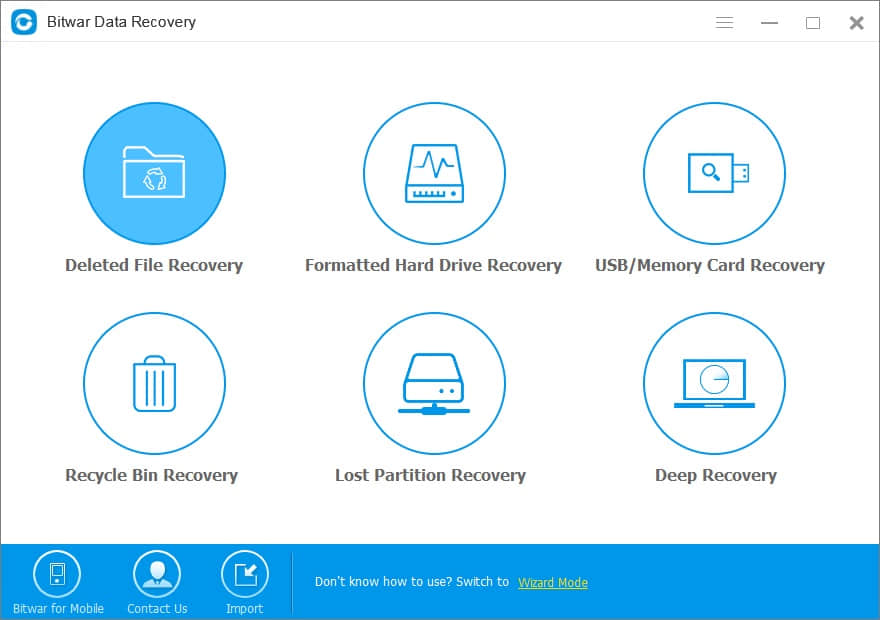
Step 1:launch Bitwar Data Recovery, Select recovery mode according to the actual situation.you can select “Deleted File Recovery”, “Formatted Hard Drive Reocovery”, “USB/Memory Card Recovery”, “Recycle Bin Recovery”, “Lost Partition Reocovery” or “Deep Recovery”.
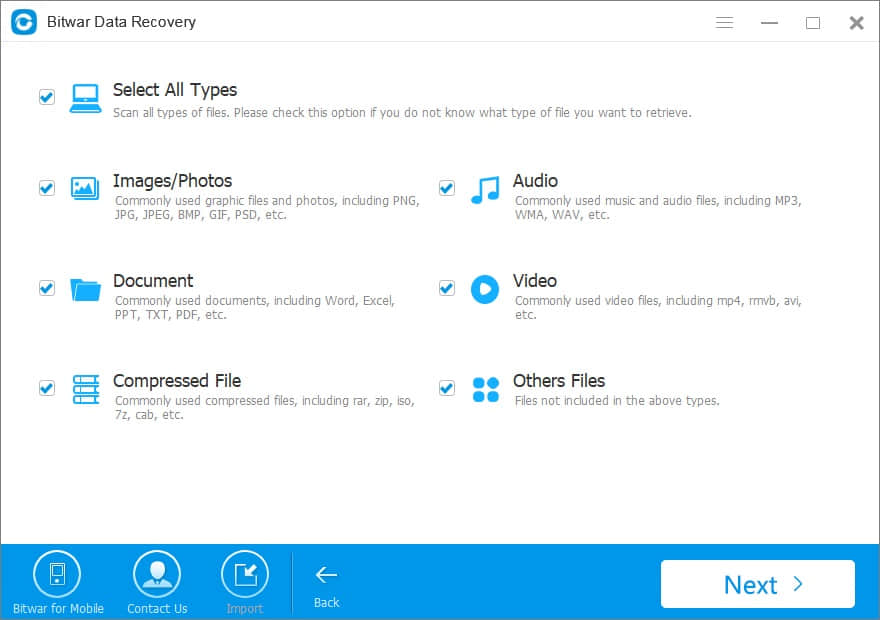
Step 2:Select The Drive you lost files and select file types, The Bitwar Data Recovery supports all file types: pictures, videos, audio, emails, documents and others.
Step 3:Preview and recover deleted files
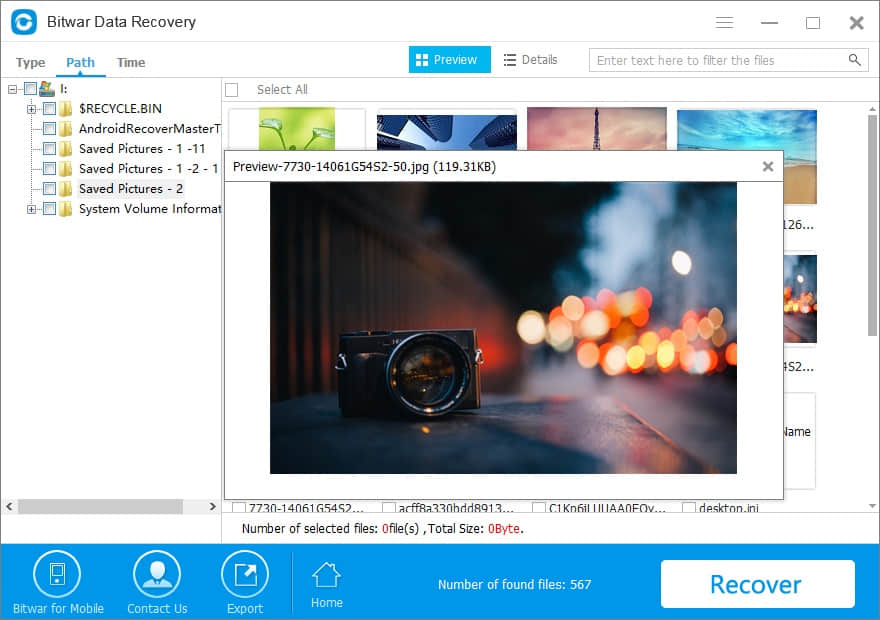
Bitwar Data Recovery will start scan quickly. After a scan, choose the data you want and you can make a selective recovery with Preview. Choose the data you want and Click "Recover" to get them back .Free Data Reco​very Software
Tips: You should save all the recovered files on another partition or device to avoid data overwriting. DO NOT save the files into the path where you lost data.
deleted file recovery software pc

we've come to the conclusion that this software is the best Deleted File Recovery App for PC which capable of recovering data from any storage, or should we say the ones we have tested. Whether it be USB flash drives, external drives, an MP3 player or memory cards, Bitwar Data Recovery will get the job done without a fuss.

2018年8月2日星期四

Free Easeus Data Recovery Crack | Data Recovery Wizard Serial Number

Summary:

Have you found the Easeus data recovery crack for 12.0 right now? If the answer is no, I would like to suggest you a free data recovery software,  which is free and full version without 2GB recovery amount limit.

How to get Easeus data recovery crack?

Easeus is one of the leading data recovery companies that developed the data recovery wizard since 2004, with decades of development, its Easeus data recovery wizard 12.0 the newest version becomes the hot pick in the computing world. However, Easeus offers only initial 2 GB for free, you’ll have to spend over $69.95 to purchase the license if the recovery amount is over 2 GB.

But I have to suggest you to stop wasting your time to search the Easeus data recovery crack 
with serial number, kickass, keygen, license key, activation code from Google, Easeus data recovery it’s a data recovery tool as other Data recovery software will do the same. Most important, you can enjoy yourself to use a free data recovery software to recover anything you want.

Stop wasting your time on Easeus Data Recovery Crack.

If you are keeping search in Google and click every website that claimed with Easeus Data Recovery crack, serial number, license key, kickass, keygen, activation code, etc. I have to say you are losing your precious data. Both of us have known that the data couldn’t be overwritten by new data; Therefore, the best choice is to
recover lost files soon as we can. Download, copy or write new data into the partition where have your lost files will cause permanent data loss, and you will lose your precious data forever.

Moreover, you have to prepare yourself to take the risk on the dangerous infection by virus, Trojan, malware, adware, backdoor that packaged with Easeus Data Recovery crack. Even more bad news there will have system crash, file corruption, personal data leak, and permanent data loss if you insist on using Easeus Data Recovery Crack.

Free data recovery software alternative to Easeus Data Recovery crack.

Here I strongly recommend you to use Bitwar Data Recovery, its step-by-step interface has clear enough guidance for green hand, moreover, Bitwar offers the bubble tips for the first run of the software, which means it can change your impression that the data recovery software isn’t just for experienced users.


Easy data recovery software - first run

What’s more, Bitwar Data Recovery helps you recover photos, documents, audio, video and archive files after emptied the Recycle Bin, formatted the partition & memory card, even you can recover data from the damaged & inaccessible SD card, hard drive or external USB drive, etc. with free Bitwar Data Recovery.

How to recover lost files with free Bitwar Data Recovery?

Step 1. Download Bitwar Data Recovery and install, and then launch the software. You can install software in Windows or Mac system.

Bitwar Data Recovery for Windows download Bitwar Data Recovery for Mac download

Step 2. Select your partition or device where have your lost files and then click “Next”.
Step 3. Choose “Quick Scan” and then hit “Next”.

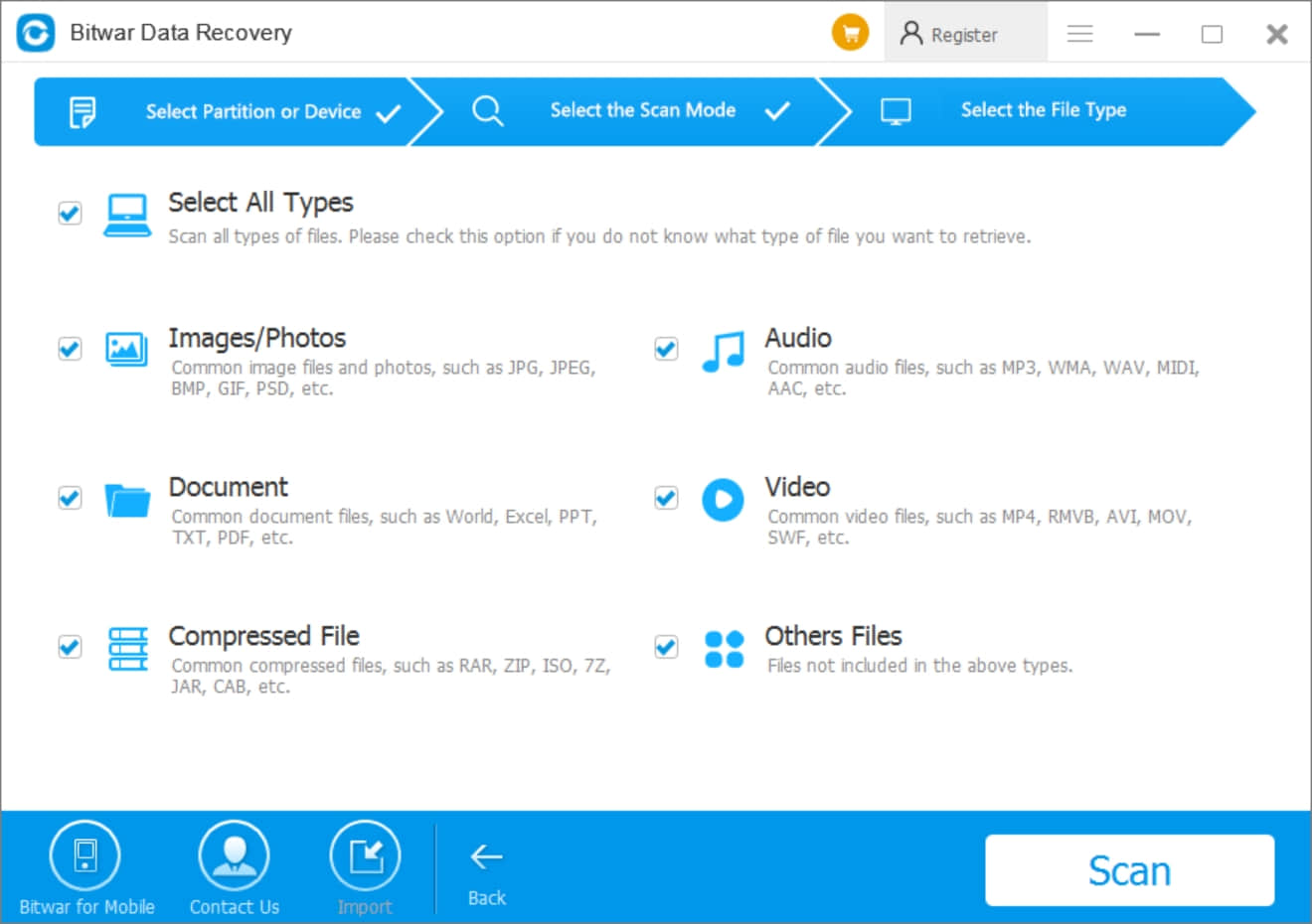
Step 4. Choose the exact types of files you have lost, select all of the types relatively if you have no ideas what kind of types need to choose.

Easy data recovery software - easy 3 recovery mode

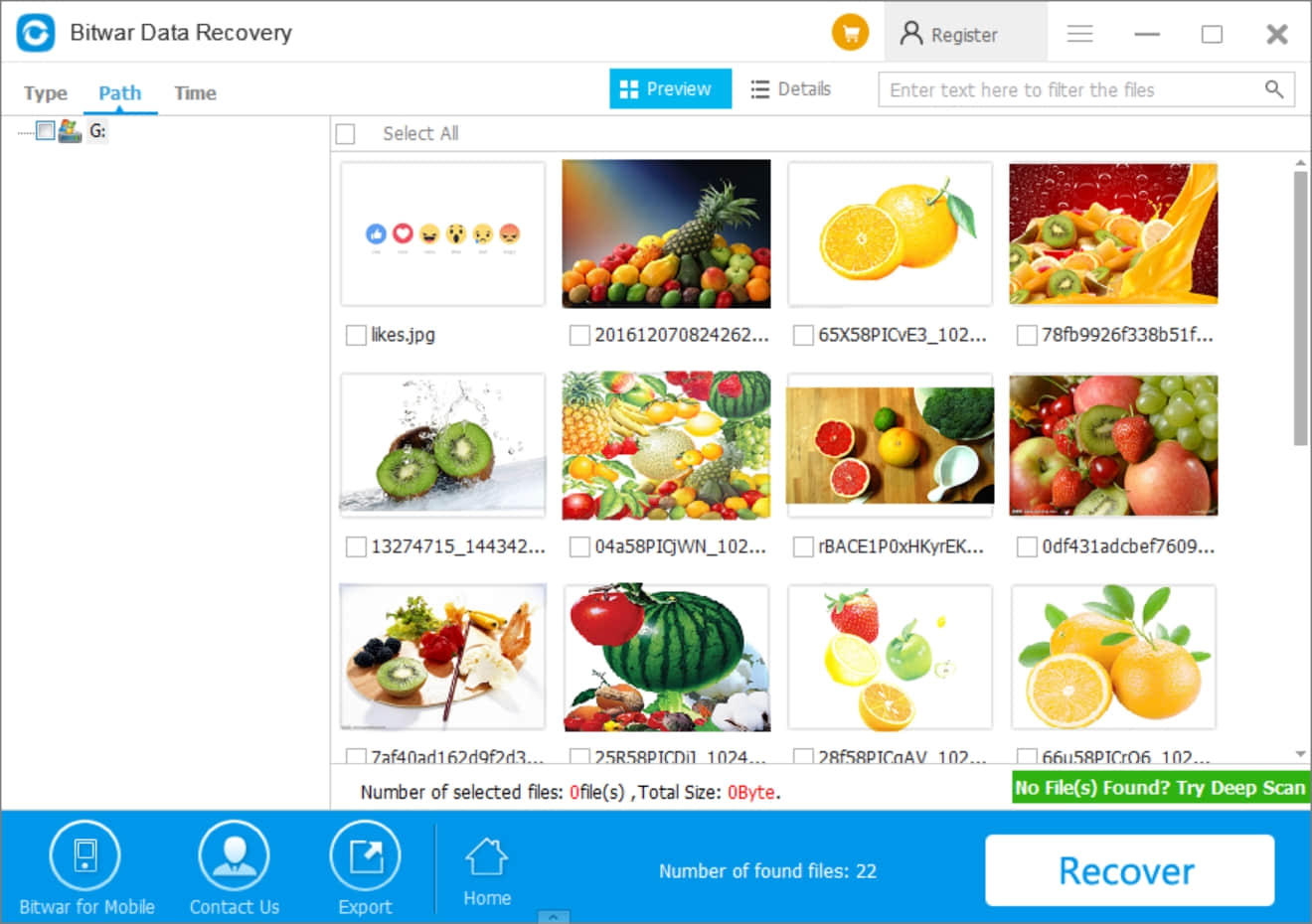
Step 5. Double-click the file to preview. You can check the file in a magnifying window and even you can play video, audio or GIF image after clicked related file. It’s a powerful preview function helps you to short the recovery time.

best photo recovery app

How to get 30-Day free trial license on Bitwar Data Recovery?

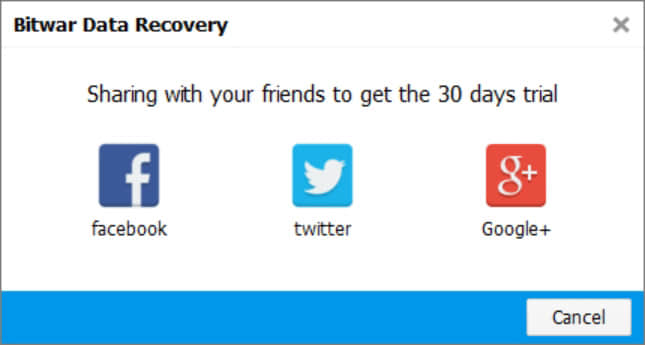
Download and Launch Bitwar Data Recovery then register an account with your email address or login directly with your Facebook, Twitter or Google+ account and then just select one of your social accounts and share the software to public on your social media profile and you will unlock a 30-day free trial after sharing.

Do Your Data Recovery
Enjoy yourself and recover anything you want now!


Easy data recovery software - 30 days free trial

CCleaner Deleted My Files - Free Data Recovery Solution

Most of us believe that CCleaner is a powerful utility program to maintain the hard disk performance by cleaning automatically the potentially unwanted files, files in the Recycle Bin, Windows registry entries, etc.

However, CCleaner may wipe the important files of yours in the Recycle Bin. Let’s see what our customer said: “I found some important files were lost from my hard disk by sending mistakenly to the Recycle Bin and unfortunately CCleaner deleted my files after I launched it, I really need the files to finish my job, and do you know how to
recover deleted files? "

How to recover data after CCleaner deleted my files?

Everyone knows the pain after data loss, moreover,moreover, we gonna be mad that CCleaner does not offer the data recovery mode for us to recover the files, then should we lost the data forever? The answer is no.

If you cannot find any data recovery solution for recovering your files till you find this article, you can reply on Bitwar Data Recovery which is a
free data recovery software that can recover accidentally deleted or formatted images/photos, documents, videos, audio, achieve files from hard drive, PC, Mac, external USB drive, etc.

Free data recovery solution after CCleaner deleted my files.

Bitwar Data Recovery it's a 30-Day Free Trial data recovery software,which you can use to recover any of the files you want with no recovery amount limit.


Bitwar Data Recovery for Windows download Bitwar Data Recovery for Mac download

Step 1, download the software, install and then launch.
Step 2, Select the Recycle Bin or the drive where have your lost files and then hit “Next”.
Step 3, Select the “Quick Scan” that has short scanning process time and this is a mode contains the important elements of file type, file path, last modification time and allows you to filter the files easily and quickly.
Step 4, After click “Next” button, you will turn to a window that waits for you to select the file types. If you have no idea what kind of file types, select all of them and hit “San”.
Step 5, Double-click to preview the lost files and hit “Recover” if the files are exactly what you need.


best photo recovery app

Therefore, there’s no need to worry after CCleaner deleted my files, follow the above tutorials to recover files you need. No matter you are using Windows or Mac computer, we have the Windows / Mac data recovery software to help you.
Data Recovery Software

Bitwar Data Recovery for Windows download Bitwar Data Recovery for Mac download

2018年8月1日星期三

The Best image file recovery software

We always keep a lot of photos on the computer, USB disk or memory card to record the wonderful moments we can't forget. but No matter how careful we may be, chances of accidentally deleting images or losing them due to some reason or the other is always possible. How to recover image file from windows computer? It's simple. provided you know the right image file recovery software.

Whether lost due to deletion, corruption or formatting of SD card or hard drives, Bitwar Data Recovery can recover your photos from any Windows or Mac OS-based storage device. Even recover your photos from a corrupt or formatted storage device.

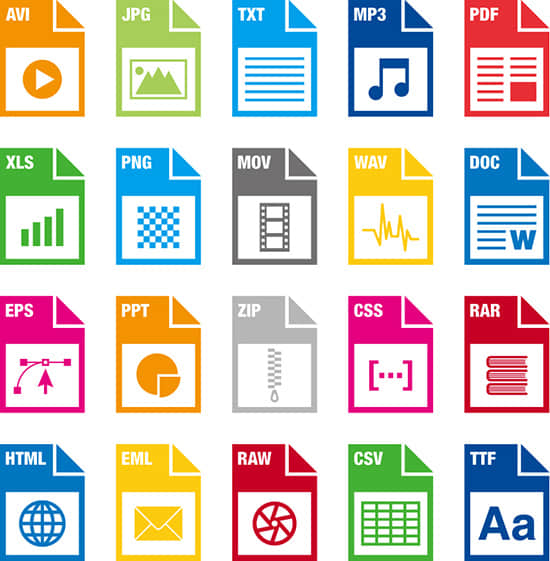
Supported photo image formats: JPG, TIFF/TIF, PNG, BMP, GIF, PSD, CRW, CR2, NEF, ORF, RAF, SR2, MRW, DCR , WMF, DNG, ERF, RAW, etc.

Supported photo storage devices: Digital cameras, external hard drives, Hard disk, CD, DVD, USB Drives, and memory cards etc.

What sets thisimage file recovery software apart from the rest is that it gives user complete operate. You can select what images you want and recover only those through the Preview feature. It even allows you to save the scan results and resume the recovery process later as required. Performing digital image recovery with this Best image file recovery software is very simple- you just have to follow the simple procedure as given ahead.

Free download The Best image file recovery software - Bitwar Data Recovery here : Data Recovery Software, install it. Please DO NOT save any files and program to the partition/devices where your data lost and you want to recover images from.

1. Before the photo recovery software begin to scan your files, it needs to know where you lost them. Launch Bitwar Data Recovery program and select the partition where you lost your images and click "Next" .
image file recovery software
2. Select the Scan Mode:
Whether the data lost due to deletion or emptied the Recycle Bin,you can recovered with “Quick Scan” mode; if the data lost due to formatted, use “Formatted Recovery” Mode; And if previous scan could not worked to find lost files,try deep scan.

●  Quick Scan: you can recover files from accidentally deletion,such as shift+delete,emptied the Recycle Bin, deleted by other software etc. The file can be retrieved completely in dondition of the files or directory structures haven’t been overwritten by other data
●  Formatted Recovery: Recover formatted files after performed a quick format on a partition or hard drive.
●  Deep scan: if previous scan could not worked to find lost files,try deep scan. The deep scan will search every every sector of hard drive to find all existing files.but the scanning process will spend more time than quick scan and will not have the original file name in the scanning results.
image file recovery software
3. Select the file types in this step. We know the “Images/Photos” type contains commonly used graphic files and photos, choose it when you want to recover images and press “next” to start scanning.
image data recovery software download
4. The scan will start quickly and you can have a rest during the scanning.

After scanning, the found files will be displayed in the window. You can preview recovered photos and then select images you need and click "Recover" to save them back .Here, you'd better save all the recovered files on a different drive or device in case of data recovery failure.
image data recovery software download
This image file recovery software is not just for Windows users- if you have a Mac, then you can download Bitwar Data Recovery for Mac and recover deleted images on Mac with similar steps and the same great results. Bitwar Data Recovery for Mac is an equally capable and trusted data recovery tool for all your image recovery needs.

Easy data recovery software - 30 Days Free Trial

There’s nothing more upset while losing data, especially it’s a disaster if we don’t have any emergency plan, what can we do to recover lost data? Today in this article, I will show you an easy data recovery software that can be trusted to recover your precious data.

Easy data recovery software - 30 Days Free Trial

Why can the lost files be recovered by easy data recovery software?

Actually, the lost files still exist in the hard drive, no matter you deleted the files and emptied the Recycle Bin or formatted the hard drive. The files are hiding in the hard drive after the system marked the space where have the lost files as free space. You can still get back those files by erasing the free space mark with
easy data recovery software.

3 questions before downloading easy data recovery software.

Everyone knows the pain of data loss; the only idea in our mind is recovering lost data as soon as possible. However, before we are searching for easy data recovery software in Google, there are 3 questions worth thinking about:

1. Does the software offer friendly user interface?
2. Does the software offer the Free Trial chance?
3. Is the software powerful enough to recover lost data?

Then, I would like to suggest downloading Bitwar Data Recovery.


Bitwar Data Recovery for Windows download Bitwar Data Recovery for Mac download

Why can you rely on Bitwar Data Recovery?

Bitwar Data Recovery fully compatible with windows 10/8/7/Vista/XP, the software specialized in recovering docs, photo, video, music and archive files. With the latest data recovery algorithm, Bitwar Data Recovery has the ability to support accidental deletion recovery, format recovery and raw recovery from SD card, memory stick, PC/Mac, hard drive, camera storage mediums, USB drive and Recycle Bin etc.

Most important, Bitwar Data Recovery is really an easy data recovery software, we offer a humanized interface with step-by-step mode for you to recover lost data safety and completely.

Key features of Bitwar Data Recovery:

1. There are Bubble Tooltips for the first run of the software:

By following the bubble tooltips, it’s easy for you to know how to do step-by-step, we received many compliments on this function which helping them through the program without any tech skills.


Easy data recovery software - first run

2. Easy 3 steps recovery mode

Should you still fear about the data recovery if you knowing Bitwar has already developed the 3 steps recovery mode makes it’s really an easy data recovery software?Most of you will understand what to do next by following the guide at the top of the software, no matter you are an experienced user or green hand.
Data Recovery Software

Easy data recovery software - easy 3 recovery mode

3. The software supports to recover any of the file types.

Sometimes, the users didn’t know exactly what kind of files have been lost, therefore, the most concerned question among them is to find an easy data recovery software to help them recovering whatever they want. Luckily, Bitwar Data Recovery supports any of the file types those run on Windows or Mac.


Data recovery sydney - select the file type

4. The software allows you to preview more than 300+ file types.

Why have all of the software suppliers developed the preview function for their users? Because the preview function is a way to help users to check the data is still complete for recovery or not. Bitwar Data Recovery is walking ahead from its rivals to support more than 300+ file types and even it allows users to play the GIF animate image, video, audio file inside the software.


Bitwar Data Recovery supports to preview dynamic GIF images

5. Recover lost data with original folder structure.

If you are afraid that you have lost thousands of files located in different folders, obviously, you will be crazy if the software recovered all of the files into same folder. The difference is that Bitwar Data Recovery allows you to check the original file path and it has the ability to recover lost data with original folder structure for you.


Easy data recovery software - file folder structure

6. 30-Day free trial and no recovery amount limits.

If you are searching for easy data recovery software in the Google, you can find many data recovery software, free download and most of the data recovery software supply 1 GB amount free for recovery. If the required recovery amount is below 1GB, you are happy to get back lost data after hit recover button.

On the contrary, Bitwar Data Recovery offers Free Trial for you to recover anything you need in the first 30 days.


Easy data recovery software - 30 days free trial

7. Read-Only Recovery.

After you clicked “Scan” button, the software just read the lost data that existing in the drive storage and display the original data on the scanning result window. If you found the data can be previewed, that means the data is still recoverable, otherwise, the data might be broken due to data were overwritten or other unknown reasons.


Bitwar Data Recovery - Partition Lost Recovery

8. 100% clean software.
Bitwar Data Recovery has won a certificate which granted by Softpedia. The software has been test deeply by the Softpedia technical team and proved Bitwar Data Recovery has no malware, virus, Trojan, spyware or backdoors. Which means you can use Bitwar Data Recovery with more confidence. No wrroy anymore the software will destroy your precious data.


Congratulations: Bitwar Data Recovery Software won a 100% CLEAN Award which granted by Softpedia.


Humanized license charges after 30-Day free trial.

With the 30-day Free Trial, it’s good enough for you to test the recovery process and success rate. You can buy annual or lifetime license when you need to use it longer than the initial 30 days.

Best Data Recovery Software Bitwar Data Recovery charges $49 for annual license and $99 for lifetime license. We do not have any charge plan that deduct from your Credit Card or PayPal account periodically. All of the charges from us are one-time fee, you can decide on you own to buy or not after license expiration.

2018年7月31日星期二

Top rated file recovery software

Every day, many people lose files from different devices, Whether it's a virus infection, a hardware failure, or just human error, it's all too easy to lose vital files. we know that all of them want to recover the data, but not everyone finally recovers the data. In that case, we recommend a top rated file recovery software to recover your important data back.Deleted File Recovery Software

Bitwar Data Recovery is a fast, reliable and top rated file recovery software with powerful functions.

It has the following important features

#1 Security - The first criterion you should take into consideration is whether the software is virus-free and safe to use. Otherwise, the files on your computer or device may be damaged, or even raise privacy concerns.The Bitwar Data Recovery installation package is guaranteed to contain no software bundles and backdoor. Does not view and reveal your privacy. You can safely install, disconnect Network recovery, and finally uninstall after recovery.

#2 Recovery model - A best file recovery software can recover lost data for a variety of reasons. Like mistakenly deleted, incorrectly formatted, emptied the recycle bin,etc. Bitwar Data Recovery have recovery mode like deleted file recovery, formatted hard drive recovery, USB/Memory Card Recovery, Recycle Bin recovery, lost partition recovery, deep recovery (Although, normal scan is enough, but you can also deep scan (takes more time) to further increase the possibility of recovering data. ).

#3 Supported File Types - Also, a best data recovery software should be qualified for retrieving as many file types as possible, like photos,images, audio, document, video, compressed file and other files. Bitwar Data Recovery can retrieve files of all types.

#4 fastest Recovering Speed - Bitwar Data Recovery applies the best technologies to give you the fastest scan, instant preview, and lightning recovery. the whole recovering process just a few minutes are needed. You are also allowed to preview and selectively recover the files you really needed, but not all files.

#5 Easiest Operation – Bitwar Data Recovery makes complicated data recovery as plain as 3 clicks, no tech knowledge required.

How to Use Bitwar Data Recovery to recover deleted data

Go to the Download Page of Bitwar Data Recovery and click on the button “Download” to download it on your Windows or Mac computer, install it and follow the steps below to recover the file.
Download Bitwar Data Recovery: <
Data Recovery Software

 deleted file recovery software

Step 1:Launch Bitwar Data Recovery
When the installation is complete, Launch Bitwar Data Recovery ,In the standard mode, you can see 6 different data recovery modules here, and each of them focuses on different data loss scenarios. Select a mode based on your data lost when you want to find it back.
●  Delete File Recovery:Disk data accidentally deleted or empty the Recycle Bin can be recover from her
●  Formatted Hard Drive Recovery:Mistakenly formatted disk,USB drive,removable hard drives and memory cards can be restored from here;
●  USB/Memory Card Recovery:Accidentally deleted files on USB drive,removable hard drives,memory cards and camera card can be restored from here;
●  Recycle Bin Recovery :Recycle Bin emptied by mistake or Deleted files from Recycle Bin can be restored from here;
●  Lost Partition Recovery:Accidentally re-partition or Ghost installation system causes the partition lost,you can find lost partitions and files here;
●  Deep Recovery:Matching existing file structure in partition can find more files,but with no file name provided,scanning will take longer.
Top rated file recovery software

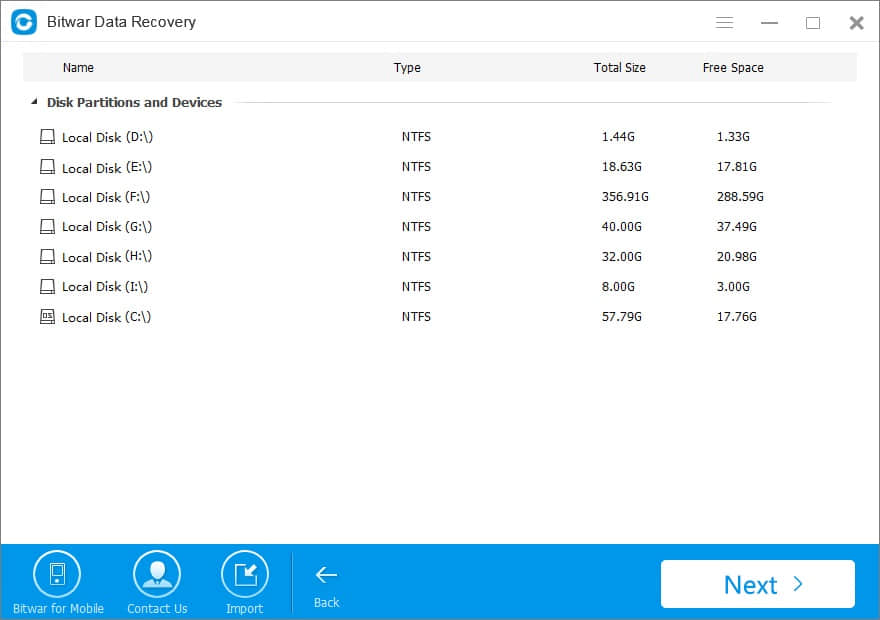
Step 2: Select ranges of restores
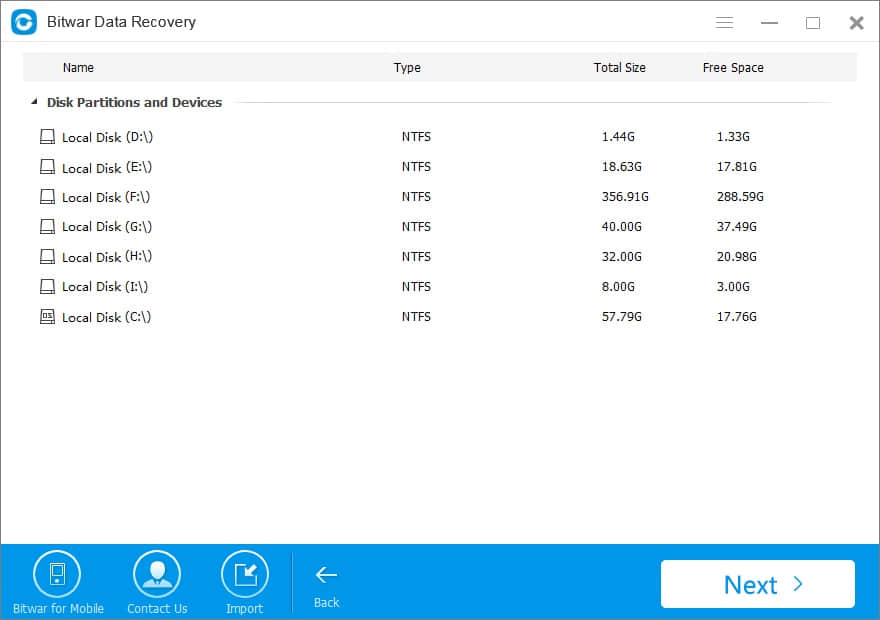
select the partition/drive where you want to find the lost files back from. then click "Next".
Top rated file recovery software
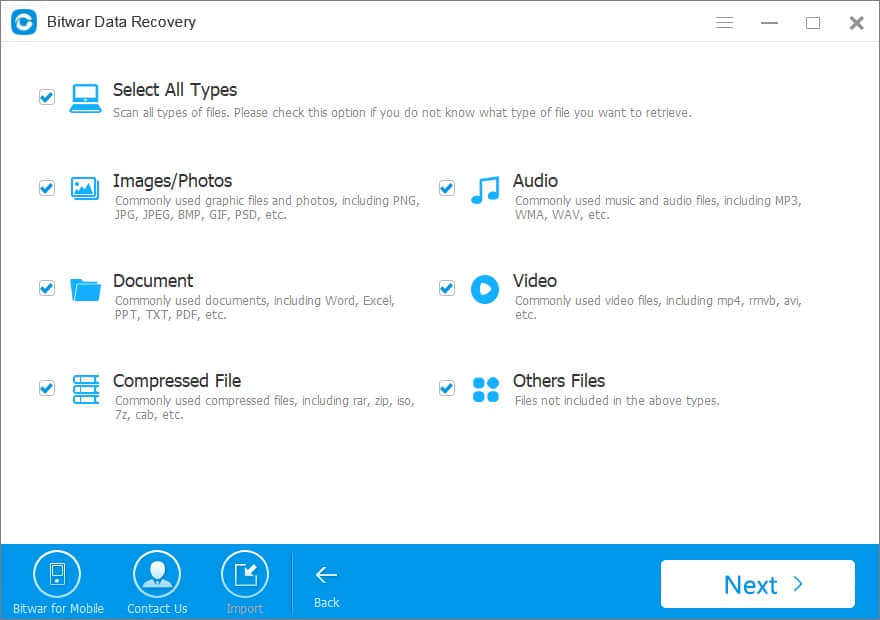
Select the types of files. You can choose the type of Images, photos, Audios, Videos, Documents, Compressed Files etc. Then click on the button "Next" .

Step 3: Preview and recover the lost files
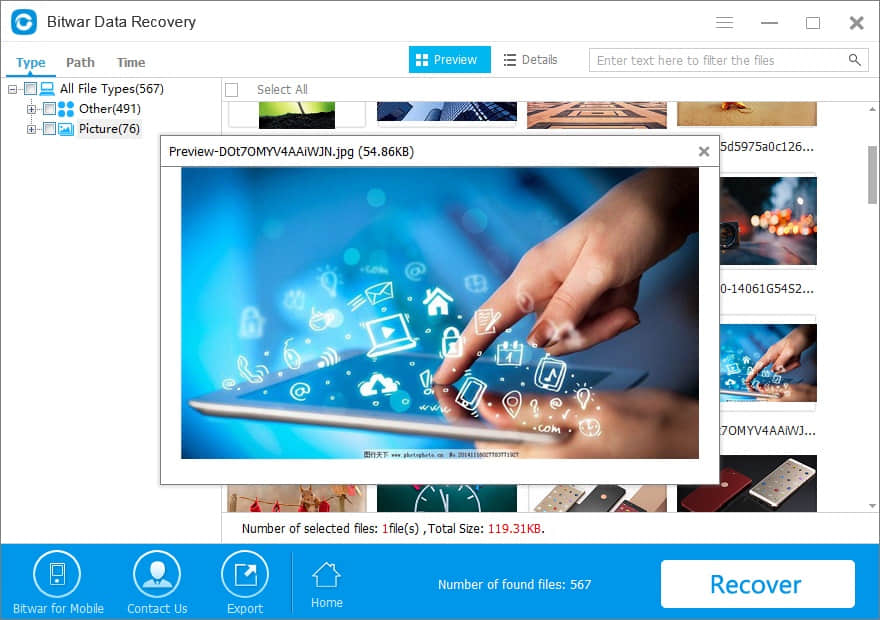
Bitwar Data Recovery will start scan quickly .You can pause your recovery progress temporarily and resume later. Also you are able to export scanning results if necessary. After a scan,you can make a selective recovery with Preview before recovery to determine which one you want.Deleted Data Recovery
how to recover lost or deleted files

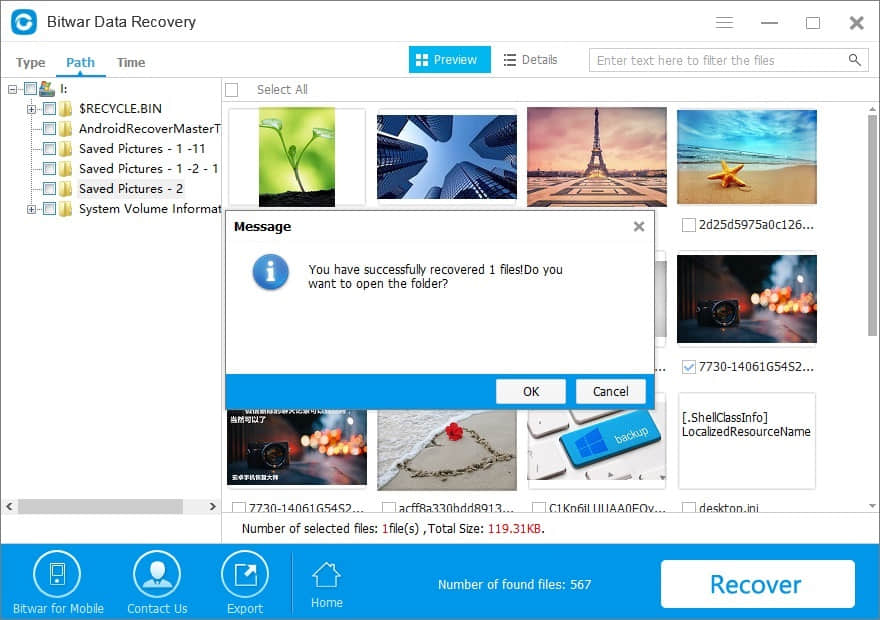
Choose the lost data you want from the scanning results and click on the "Recover" button to save all the lost files back .
Tips: please save files to another partition or disk to avoid data overwriting.
deleted file recovery software pc

Now you know, using Bitwar Data Recovery to recover data is very simple and convenient, you do not need to know any data recovery knowledge, According to the operating procedures, you can recover lost files easily and quickly. Overall, Bitwar Data Recovery is the Top rated file recovery software to recover accidental deleted files, thanks to its inherent efficiency and simplicity.

Easeus Data Recovery Pro Crack with Latest Key Generator

Do you think get Easeus Data Recovery pro crack with latest key generator, serial key or license code is really a good choice? Are you sure you want to take the risk to download the crack version? Why not try a free data recovery software that is a 100% virus-free and full functions version.

Bitwar Data Recovery for Windows download Bitwar Data Recovery for Mac download

How to get free Easeus Data Recovery pro crack with latest key generator, serial key or license code for 12.0.

None of us likes the feeling after accidentally deleted or formatted the precious documents, photos, video, and audio from the hard drive or SD card? It’s even more hopeless that we don’t have an emergency backup plan. Most of you may search in Google and hope that find out data recovery tools that can help
retrieve lost files, but they are not free or with function limits.

Easeus Data Recovery professional version is such tool for data recovery that is same as other Windows & Mac data recovery software, but will Easeus Data Recovery pro crack going to save your time? Things go contrary to your wishes. As we have known many of the examples that risk you by using Easeus Data Recovery pro crack with latest key generator, serial key or license code for 12.0.


Easeus Data Recovery pro crack 12.0

100% virus-free and safer alternative solution to Easeus Data Recovery Pro Crack.

You may not think too much of the case we mentioned above and still ask for the Easeus Data Recovery pro crack, serial key or license code. However, you should know something before believing on the pirate websites:  virus or Trojan infection, malware or adware embedded with the crack version, privacy data leak, system crash or file corruptions, etc.

Why not try to use a free data recovery software and stop using Easeus Data Recovery pro crack or purchasing the high price of copyrighted license code from Easeus?
The best free data recovery software that we would like to recommend to you is Bitwar Data Recovery, which is different from Easeus Data Recovery that only offers 2 GB recovery amount for free.

You can recover all of your precious documents, images/photos, video, audio and archive files in 30 days Free Trial with Bitwar Data Recovery instead of worrying about the virus, Trojan, backdoors, spyware or malwares on the Easeus data recovery pro crack. Bitwar Data Recovery is a 100% clean software that has read-only recovery technology and with latest recovery algorithm, it recovers your precious data safety and effectively.

Free Download Bitwar Data Recovery.


Bitwar Data Recovery for Windows download Bitwar Data Recovery for Mac download

How to Recover Lost Data with Free Bitwar Data Recovery?

Simply follow 3 steps to recover lost data completely and quickly.

Step One, select the partition or device where have your lost data and click “Next”.
Step Two, choose the scan mode, select the file type(s) and then hit “Scan”.
Step Three, preview the selected file(s) you need after the scan process finished and then click “Recover”.


best photo recovery app

Don’t take the risk for Easeus Data Recovery pro crack, serial key or license code, it wastes your time on recovering your precious data or may cause permanent data loss. Bitwar Data Recovery would like to be your powerful assistant to help you walk out every of data loss nightmares.Recover Deleted Files From Hdd

2018年7月30日星期一

How can you recover hard drive data after format?

The Format commands are typically run to prepare a new logical drive for use after Fdisked hard drive - enabling the installation of an operating system, application programs & eventual user data. When you format a disk, the operating system erases all information on the disk, tests the disk to make sure all sectors are reliable, marks bad sectors, and creates internal address tables. You must format a disk before you can use it.
  Formatted Data Recovery Software
If you accidentally format your hard drive or disk that contains useful files, do not be panic, you can still recover your lost data. Bitwar data recovery software can help you.

Bitwar data recovery is a best format recovery software that can help you to recover files from a formatted hard drive in quick and easy-to-follow steps. It is compatible with all the versions of Windows including 10, 8, 7, Vista and XP. If you are suffering from data loss disaster caused by hard disk formatting and trying to find a reliable format recovery solution to rescue your files,  Just with simple clicks, it can help you recover formatted hard drive and get back all your lost data.

For a successful data recovery, there is one thing you should take care: once the partition or hard disk is formatted, the original files still exist and they can be easily covered by the new files. Once these old files are corrupted, even if you perform format recovery, you cannot open & use them anymore. It means that you have to recover formatted data from hard disk as soon as possible.

You should download and install Bitwar data recovery on your computer, follow the step-by-step procedure on how you can recover data from formatted hard drive. if your formatted drive is an external device, you should connect it to the computer and recover it like hard drive.
Tips:Remember not to save other files or install Bitwar Data recovery to your formatted partition.
recover hard drive data after format

How to Recover Data from Formatted Hard Drive

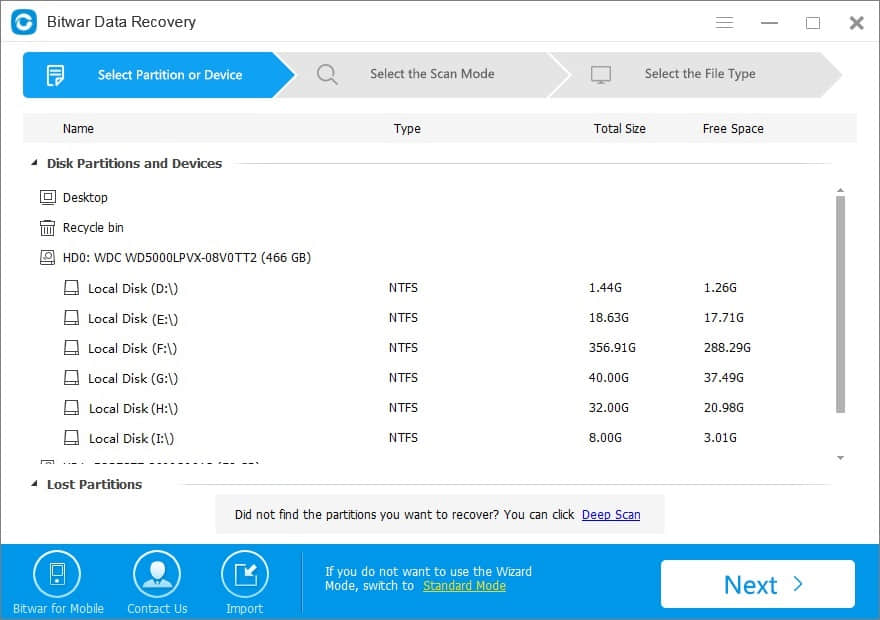
Step 1. select partition or device

When Data Recovery Software is installed, Launch the software. select the partition or device where you want to recover your files and click "Next".
formatted data recovery software

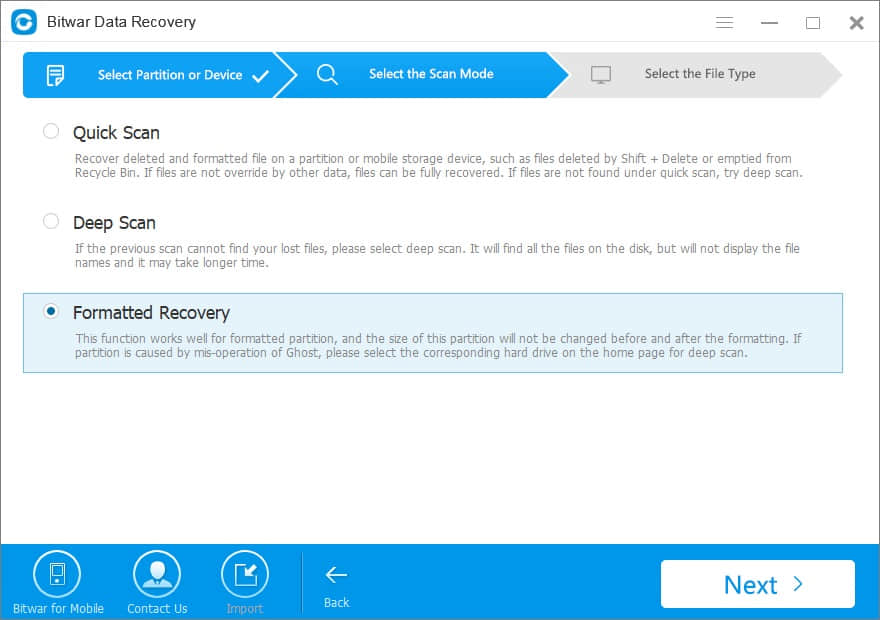
Step 2: Select the Scan Mode

You can use “Formatted Recovery” mode to Recover formatted files after performed a quick format on a partition or hard drive. Select “Formatted Recovery” and click on the "Next" button.

And if files are not found under Formatted Recovery,you can try deep scan on this page. The deep scan will search every every sector of hard drive to find all existing files.but the scanning process will spend more time than quick scan and will not have the original file name in the scanning results.
best program to recover data after format
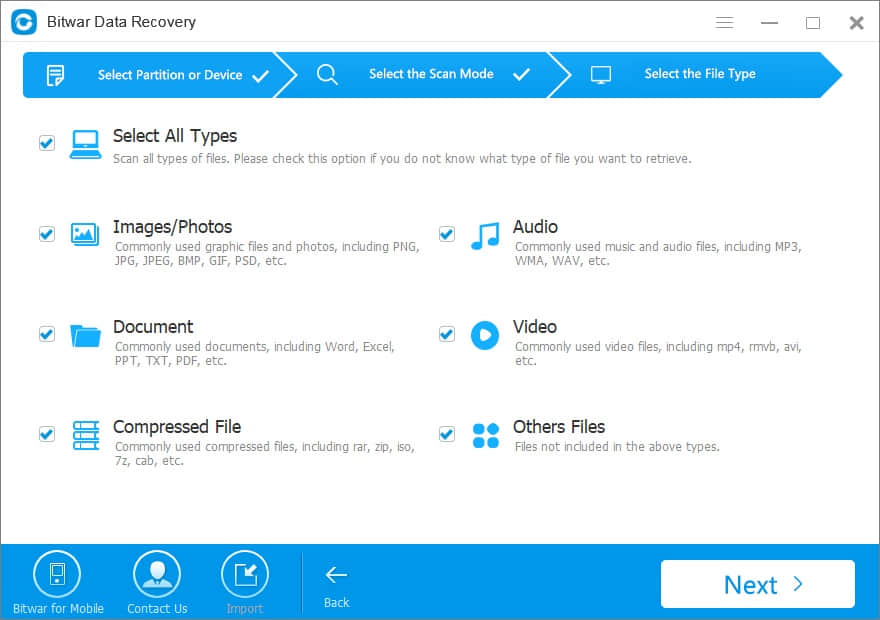
Select the file types you want, Bitwar Data Recovery can recover all types of files.If you want to recover all types, select “Select All Types” and click “Next” to start scanning.
how to recover lost files after format
While scanning, you can pause and stop the scanning processes to preview the find data you scanned out. you can also export the scan results by clicking Export Scan Status, and Import the use when needed.
Step 3: After the scan, preview all the listed recoverable files. You can preview them one by one to make a selective recovery. When you have determined the files which you want them back, select it and click the "Recover" button to save it to another partition or external device.format recovery
Caution: Save the recovered data to another partition or drive instead of the formatted one, for it may result in overwriting data and permanent data loss!
recover data after format windows 7 it when to f drive
With the action above, you have recovered hard drive data after format.

While the reasons for data loss in hard drives are mostly physical, sometimes they are also due to a mere human error. When your hard drive accidentally formatted, it’s best to stop using your computer after closing off all the unnecessary programs. It is possible to recover a formatted hard drive because all the erased data is still stored on the hard drive as long as it is not overwritten by fresh data.

Best Free Video Recovery Software Restores Deleted HD Videos

Summary:Video recovery software helps to recover deleted HD videos from a hard disk,USB portable disk, memory card, SD card or other device...